If you've ever stared at a Sudoku grid feeling stuck, with no obvious cell to fill and no idea how to proceed — pencil marks are almost certainly the answer. Most casual solvers treat note-taking as a crutch or a sign of weakness. Professional solvers treat it as the foundation of every technique beyond the beginner level.
This guide explains the complete pencil mark system — what to write, when to update, how to read the patterns that emerge, and how Sudoku Dark's note mode makes the process faster and cleaner.
What Are Pencil Marks?
A pencil mark (also called a candidate, note, or possibility) is a small number written inside an empty cell to indicate that the number could legally go there, based on the current state of the puzzle. A cell might contain the candidates {2, 5, 8} — meaning 2, 5, and 8 are all consistent with the row, column, and box constraints at that point.
Pencil marks are not commitments. They are hypotheses, systematically recorded, that you refine as the puzzle develops.
When Should You Start Writing Notes?
The most common mistake is either writing notes too early (before exhausting obvious singles) or too late (after spending 20 frustrated minutes on a gridlock).
The right moment is: as soon as lone singles and hidden singles stop producing new placements. At that point, continue:
- Go through every empty cell systematically (left to right, top to bottom).
- For each cell, eliminate every digit already present in its row, column, and box.
- Write the remaining candidates as small notes in the cell.
- By the time you've done this for every empty cell, the patterns that unlock the puzzle will become visible.
In Sudoku Dark
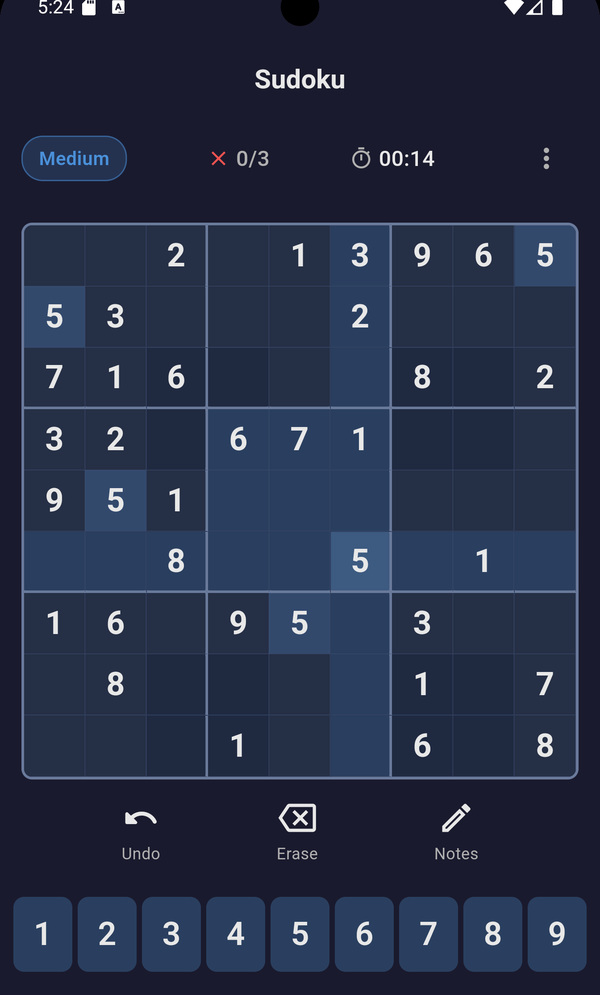
Tap the pencil icon to enter note mode. Tap a digit to add or remove it from a cell's notes. When you confirm a number, the app automatically clears that digit from notes in the same row, column, and box — so you don't have to update manually.
How to Keep Your Notes Accurate
Notes are only useful if they're correct. An outdated note that still shows a candidate that should have been eliminated will mislead you. Two rules keep notes clean:
Rule 1: When you place a number, immediately update its row, column, and box
If you fill cell R3C5 with a 7, remove 7 from the candidate list of every other empty cell in row 3, column 5, and the middle-centre box. In a digital app like Sudoku Dark, this happens automatically.
Rule 2: Don't add a candidate unless you've verified it's legal
Before writing a number in a cell's notes, check that it doesn't already appear in the row, column, or box. This sounds obvious, but rushing through note setup leads to stale candidates that cause confusion later.
Reading the Patterns in Your Notes
Once your grid has candidates in every empty cell, you're ready to apply advanced techniques. Here's what to look for at each stage:
Look for cells with only one candidate
These are naked singles — fill them immediately and update the grid.
Look for digits that appear only once in a unit
Scan each row, column, and box for a digit that only appears in one cell's candidate list. That cell must contain that digit (hidden single) — fill it and update.
Look for two cells that share the same two candidates
This is a naked pair. Those two digits are locked in those two cells; eliminate them from all other cells in the same row, column, or box. See our advanced strategies guide for more on naked pairs, X-Wings, and beyond.
✓ Do
- Write all valid candidates at once before trying to solve further
- Update notes immediately after each placement
- Use note mode for every puzzle rated Medium or above
- Trust the notes — if only one candidate remains, it's correct
✗ Don't
- Skip notes because they "clutter" the grid
- Leave stale candidates after placing numbers
- Write candidates based on memory — always verify
- Erase all notes just because you placed one number
Notes and Cognitive Load
The deeper reason pencil marks matter is cognitive: the human brain has a limited working memory. Trying to track all possible candidates for eight empty cells in your head while also scanning for patterns is cognitively overwhelming. Written notes offload that burden to paper (or screen), freeing your working memory to focus on pattern recognition.
This is why experienced Sudoku solvers are faster with notes, not slower. The time spent writing candidates is more than recovered by the speed at which patterns become visible once they're written down.
Full Candidate Mode vs. Targeted Notes
There are two note-taking styles:
Full Candidate Mode
Every empty cell gets every possible candidate written in it. This is the recommended approach for Hard and Expert puzzles — it makes every pattern visible and leaves nothing to chance.
Targeted Notes
You only write notes for specific cells you're actively reasoning about. This works well on Medium puzzles where most cells can still be filled by singles, and only a handful need candidates. It's faster, but riskier — you might miss a pattern elsewhere in the grid.
For most players, starting with Full Candidate Mode on Hard and Expert, and using Targeted Notes on Medium, is the right split.
What Notes Unlock: A Summary
Without notes, you can use: lone singles, hidden singles (with effort).
With notes, you can use: hidden singles (easily), naked pairs, hidden pairs, pointing pairs, naked triples, X-Wing, Swordfish, Y-Wing, and every other advanced technique.
Put differently: notes are the prerequisite for roughly 80% of Sudoku's solving toolkit. Players who skip them aren't choosing a harder path — they're locking themselves out of the most interesting parts of the game.
Practice Note-Taking in Sudoku Dark
Sudoku Dark's note mode auto-clears candidates when you fill a number, so you can focus on strategy, not bookkeeping. Try a Hard puzzle and see how much farther you get.
Play with Notes — Free